
Today’s update adds a small but powerful improvement to Floaty — a new menu bar window list for faster pinning and unpinning.
✨ What’s New
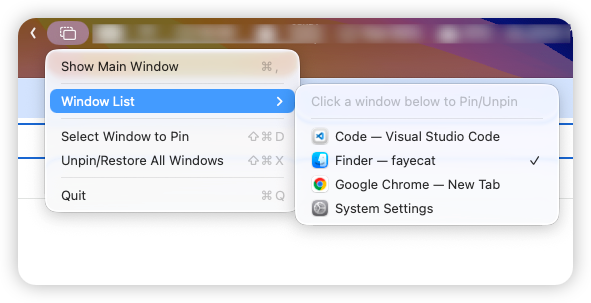
Menu Bar Window List
Quickly pin or unpin any window directly from the macOS menu bar. No need to open the main Floaty window — just:
- Click the Floaty icon
- Choose Window List and click the window you want to pin or unpin
It’s perfect for multitasking, coding, research, and comparing pages when you need a window to stay visible.
Quick Actions
The refreshed menu includes:
- Show Main Window
- Window List
- Select Window to Pin
- Unpin/Restore All Windows
These shortcuts make Floaty more accessible during fast-paced workflows and help keep your workspace tidy.
🚀 Available Now
Update Floaty to get the new menu bar entry instantly.
Let me know how the new menu fits into your daily workflow — more improvements are on the way.